Recipe costing
Know the margin on each dish.
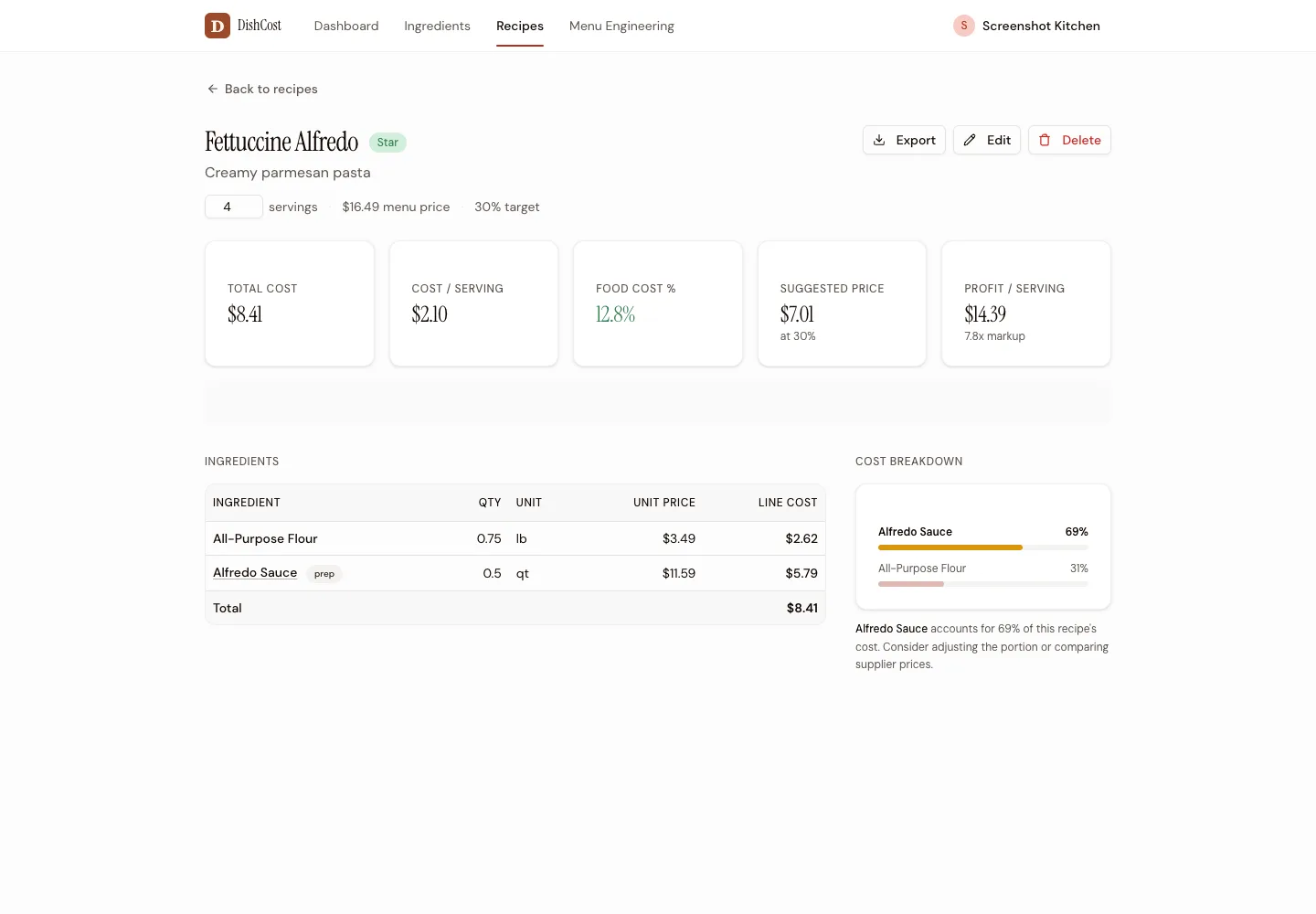
See ingredient line costs, cost per serving, food cost percentage, suggested price, and profit per serving on one screen.
Recipe costing software
Start with one dish and your own ingredient prices. Save the recipe, then change a shared ingredient price to see every affected dish recalculate. Pro is $39/month. Cancel anytime.
Three saved recipes free. No time limit or credit card.
Want help entering your menu? See the ten-dish setup offer.Enter ingredient quantities, portions, and a menu price. Check cost per serving and food cost percentage with your own numbers. You can save three recipes free.
Pro imports ingredient or supplier order-guide CSVs. Check the columns, pack sizes, and units in the preview. Existing recipes may need to be entered again; ingredient import does not import a whole recipe file.
For order guides, keep the vendor and item codes consistent. Review the changes before importing. The new ingredient prices flow through to saved dishes. You upload each new file; this is not a live supplier feed.
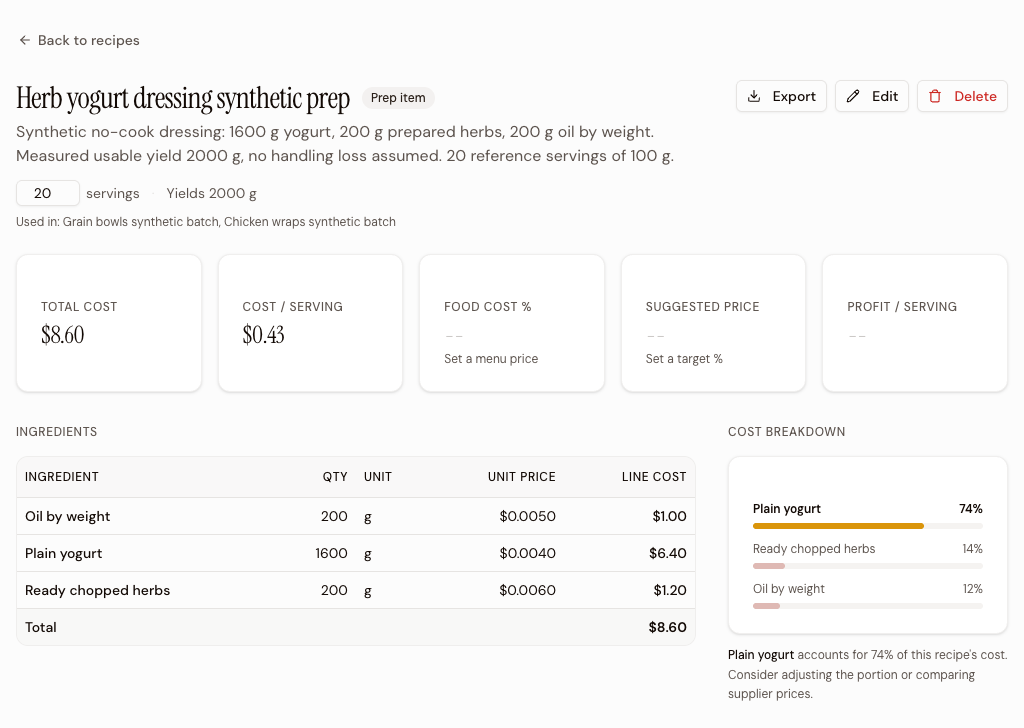
Save a dressing once, then select that same prep item in each dish. We checked this in the app with a synthetic herb yogurt dressing and two dish batches. One yogurt price edit from $3 to $4/kg changed the prep and both dishes without editing their recipes.
The dressing uses 1,600 g yogurt, 200 g prepared herbs at $6/kg, and 200 g oil by weight at $5/kg. Use your measured usable yield; this example assumes 2,000 g with no handling loss. Set Yield to 2,000 g and Servings to 20 for 100 g reference portions. Yield sets the prep cost per g; Servings sets its cost per portion.
| Saved recipe | Batch before → after | Per serving before → after |
|---|---|---|
| Dressing, 20 servings | $7.00 → $8.60 | $0.35 → $0.43 |
| Grain bowls, 10 servings | $10.00 → $10.80 | $1.00 → $1.08 |
| Chicken wraps, 8 servings | $11.00 → $11.32 | $1.375 → $1.415 |
Scroll the table to see per-serving costs.
The bowls use 1,000 g dressing across ten portions; the wraps use 400 g across eight. Their other ingredient costs stay at $6.50 and $9.60 per batch. Enter prep quantities in its yield unit, here g, and set each dish's Servings field explicitly. The wrap costs display as $1.38 and $1.42 after rounding. Packaging, labor, and overhead are excluded.
See the numbers
No sales demo. These are the screens you use to cost recipes and check your menu.
Recipe costing
See ingredient line costs, cost per serving, food cost percentage, suggested price, and profit per serving on one screen.
Menu costing
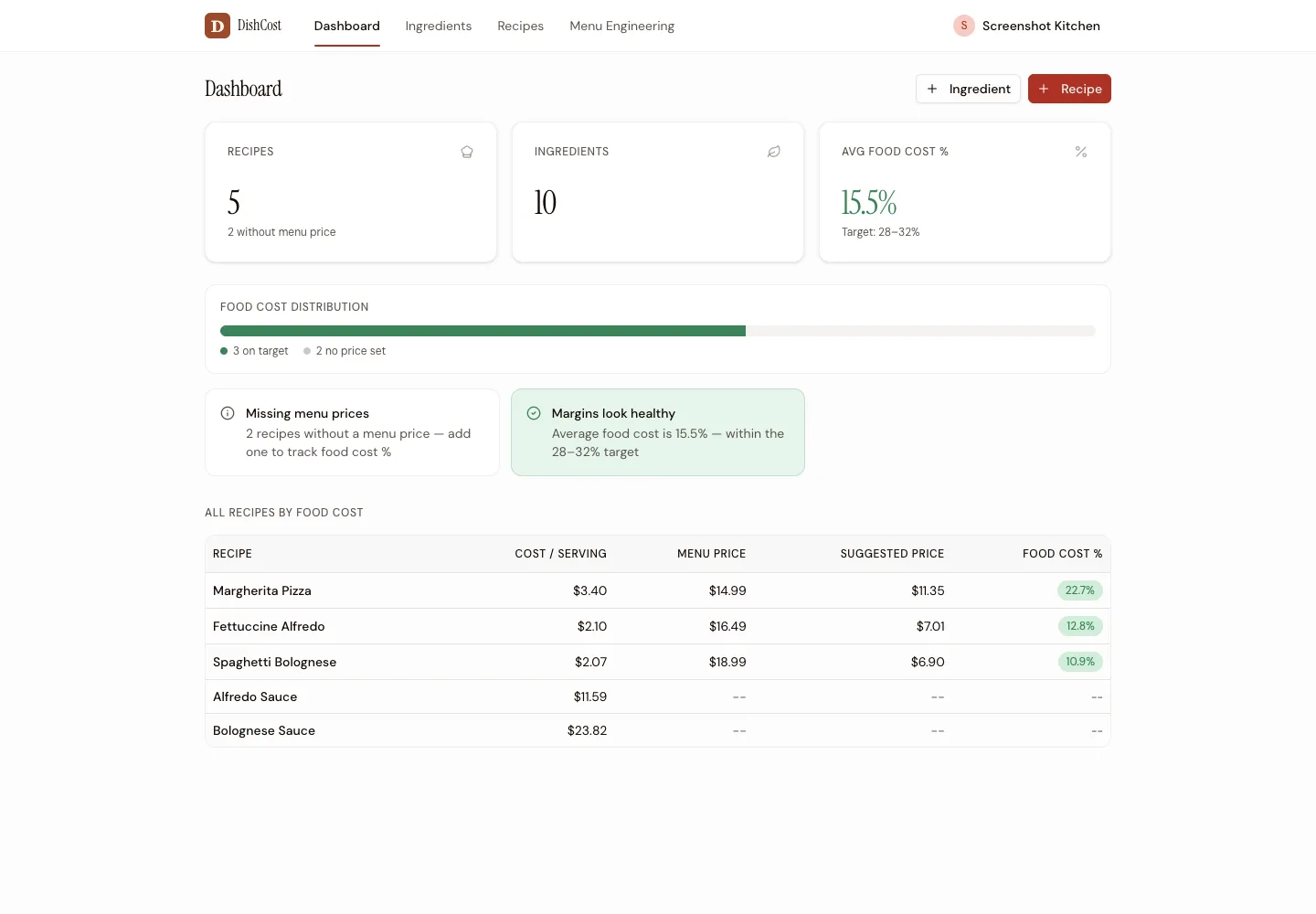
The menu overview ranks every recipe by food cost. A distribution bar separates healthy dishes from recipes with high costs or missing prices.
Menu engineering
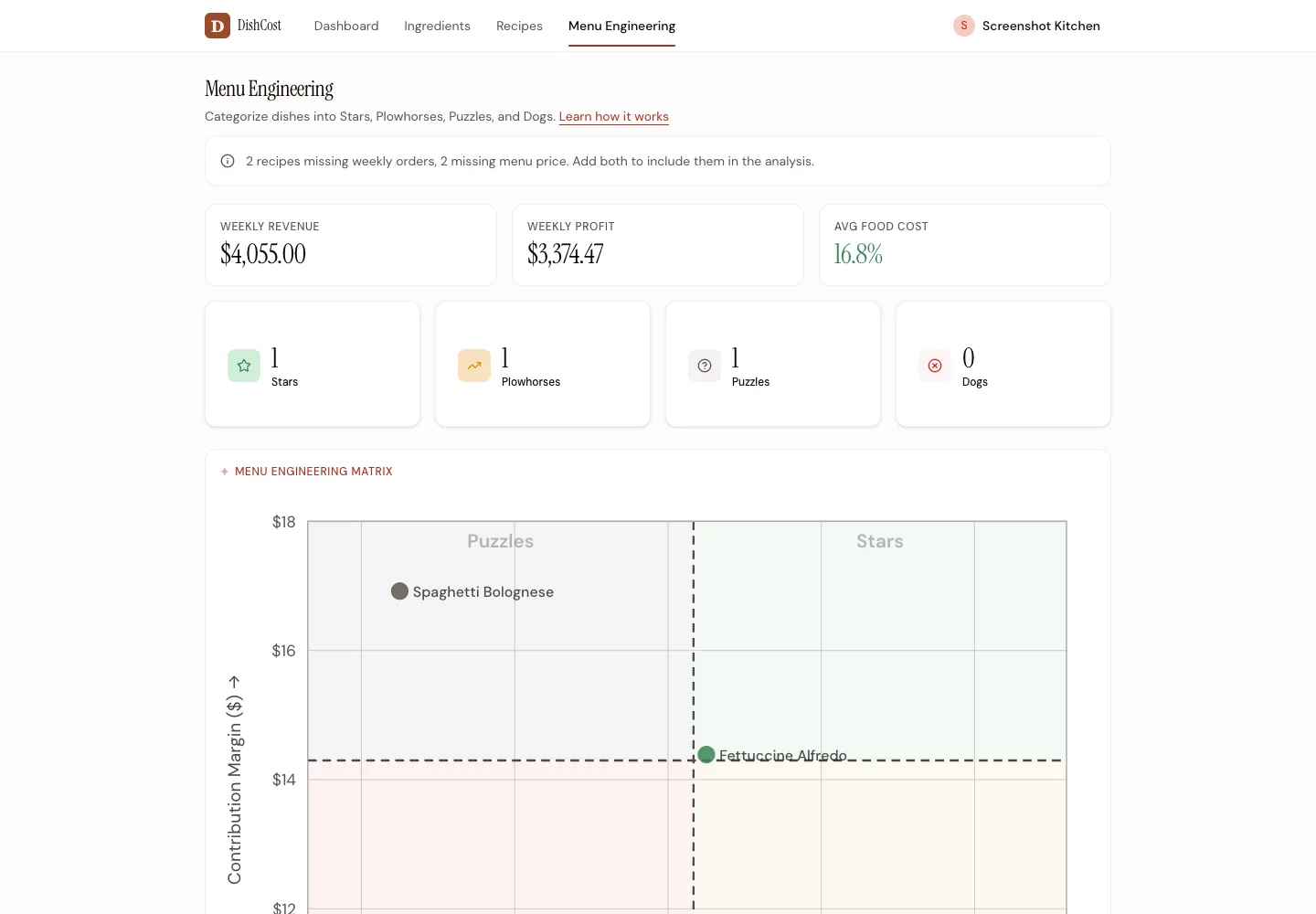
Add weekly orders to sort dishes into Stars, Plowhorses, Puzzles, and Dogs. Then decide what to promote, reprice, or cut.
Spreadsheet or software?
Already have an ingredient sheet? Import the CSV instead of typing it again. For a neutral breakdown of the options, read our recipe costing software guide.
Food costing
Nothing to install. No POS required.
Add ingredients and quantities, then see the total cost and cost per serving as you build. No formulas or cell references.
Set your menu price and DishCost shows your food cost percentage. Set a target percentage and you'll also see the price needed to reach it.
Change an ingredient price once and every recipe using it recalculates. Price alerts show which dishes moved and by how much.
Define sauces, doughs, and stocks once. Use them in other recipes and let their costs flow through automatically.
Bring in an existing ingredient spreadsheet or upload new prices in bulk. A downloadable template shows the format.
Upload a supplier CSV and map its columns. Re-upload with the same vendor key and SKU to refresh prices. Pro plan; check your file format first.
Compare
DishCost is $39/mo and month-to-month.
Competitor details checked October 9, 2026. MarketMan Starter includes recipe costing at $249/month. Confirm location charges, add-ons, and contract terms in your quote. xtraCHEF pricing requires a Toast quote. Its recipe module requires Pro; you can start onboarding before Toast POS is live. Confirm POS and contract requirements with Toast.
meez Starter is $24/month, or $19/month billed annually, and includes unlimited recipes, basic costing, and cost import/export. Recipe Cost Calculator Core is $24.17/month billed annually and includes Excel import and price history. Prices checked October 20, 2026.
Those plans can suit a kitchen that needs basic costing. DishCost Pro is $39/month for recipe costs, supplier CSV updates, alerts, and menu engineering. Test the workflow you need before choosing. If entering the recipes is the obstacle, ten-dish setup help is optional.
Pricing
No annual contract. Cancel from your settings whenever you need to.
For operators who want every dish accounted for.
Less than the cost of one mispriced dish per month.
Not ready to commit? Try the public recipe demo — no account needed.
Want your first ten dishes entered for you? Assisted setup is $149 once, separate from the $39/month Pro plan.
Questions
Recipe costing software calculates the ingredient cost, cost per serving, and food cost percentage for each dish. When an ingredient price changes, affected recipes recalculate without rebuilding spreadsheet formulas.
No. Recipe costing tells you what a dish should cost to make. Inventory software counts stock, tracks purchases, and measures actual usage. DishCost focuses on recipes, ingredient prices, and menu margins rather than full inventory management.
Yes. DishCost Pro imports ingredient names, prices, package quantities, and units from CSV. You can also re-upload a file to update existing ingredient prices in bulk.
Yes. Update the ingredient once and DishCost recalculates every recipe and prep item that uses it, including dishes that use that prep item.
Yes. Create a sauce, dough, stock, or other batch as a prep item, then use it as an ingredient in multiple recipes. Its cost flows through to each dish.
No. DishCost works without a POS. Enter menu prices to calculate food cost, and add weekly order counts if you want to use the menu engineering matrix.
DishCost Pro is $39 per month, with no required setup fee or annual contract. Save three recipes free, with no time limit. Optional help setting up ten dishes costs $149 once, separate from Pro. You can cancel Pro from your settings.
Start with the dish you sell most. You'll see its cost per serving and food cost percentage before you decide whether DishCost is worth paying for.